
Affecté/désaffecté ou réaffecté un étudiant via l'écran des Cohortes
1.
<span>[Base de connaissances HSPnet](index.html)</span>
1.
<span>[Base de connaissances HSPnet](file:///c:/temp/31412736-e95d-4f0d-a849-d006bea31dfc/input/Base-de-connaissances-HSPnet_4456787.html)</span>
</div>
# <span id="title-text"> Base de connaissances HSPnet : Affecté/désaffecté ou réaffecté un étudiant via l'écran des Cohortes </span>
</div>
<div id="content" class="view">
<div class="page-metadata">
Created by <span class="author"> Lise Lalonde</span>, last modified on avr. 26, 2023
</div>
<div id="main-content" class="wiki-content group">
**Guide concernant les organismes demandeurs (GCOD)**<divSommaire:
Ce guide présume que les profils des étudiants sont déjà saisies dans la base de données des étudiants.
Les profils des étudiants doivent être copiés dans la fiche de stage individuel ou de groupe.
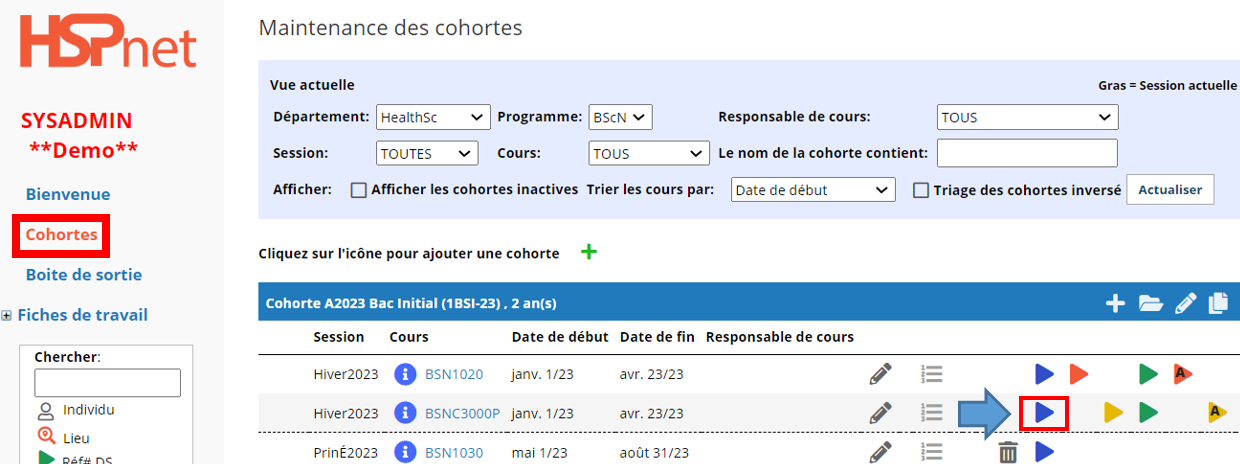
Afin de vérifier :
Sous l’écran des Cohortes, cliquez sur l’icône de la feuille d’inscriptions 


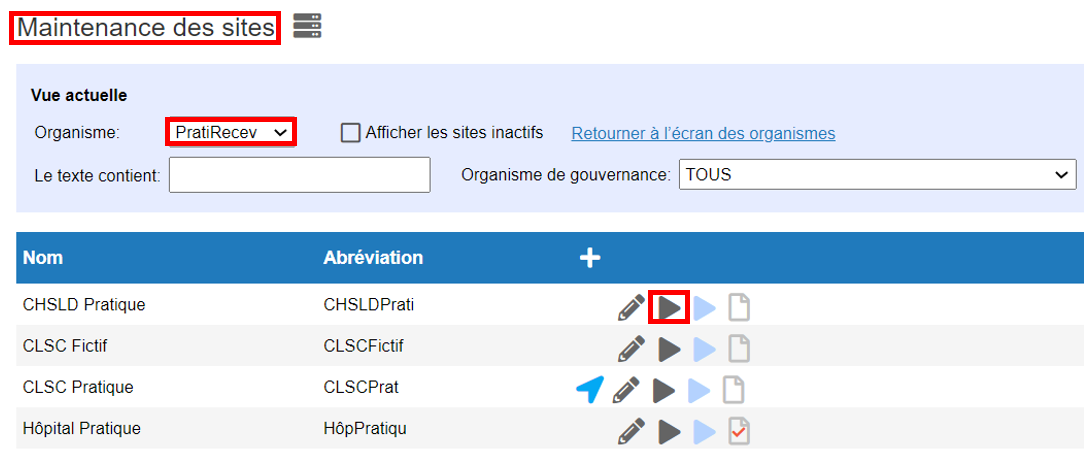
Assurez-vous que votre organisme est sélectionné dans le menu déroulant dans l'écran: Maintenance des sites
- Cliquez sur le triangle noir

 du site désiré

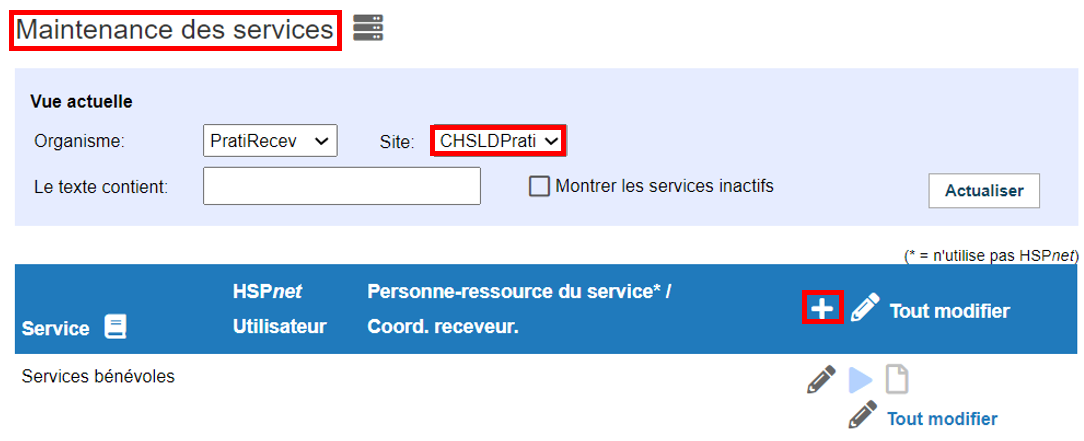
Dans l'écran Maintenance des services:
- Cliquez sur le signe plus blanc



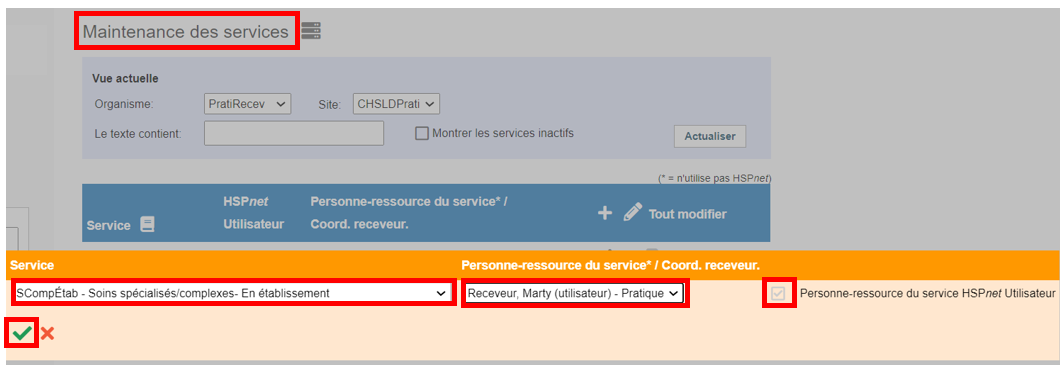
Notez que le crochet changera automatiquement à « Utilisateur HSPnet » si la personne sélectionnée a un compte d'utilisateur actif. Cliquez Sauvegarder  pour continuer.
Une fois le service ajouté, vous verrez une icône de suppression  à côté du service jusqu'à ce que vous attribuiez une destination à ce service. Pour attribuer une destination à un service, veuillez consulter le document lié.

Désactiver les services
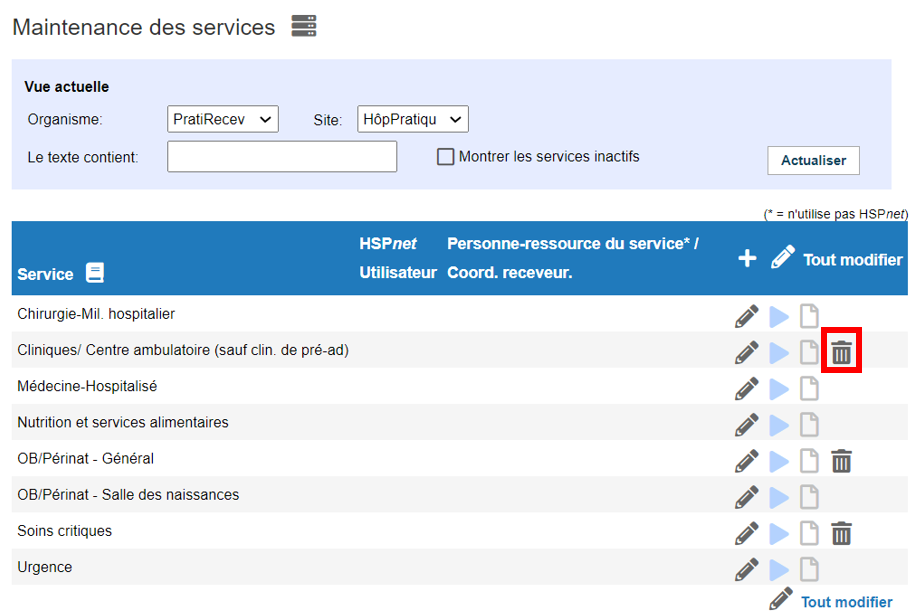
Dans Configuration - Services:
- Cliquez

 pour désactiver le service.
Si l'icône n'est pas visible, des destinations utilisent le service et doivent être retirées dans l'écran de maintenance des destinations.
- Quand l'écran est actualisé, les services seront inactivés et masqué sauf si vous cochez la case pour « Afficher les services inactifs ».
Note: Un service ne peut être désactivé que s'il n'y a aucune destination active.

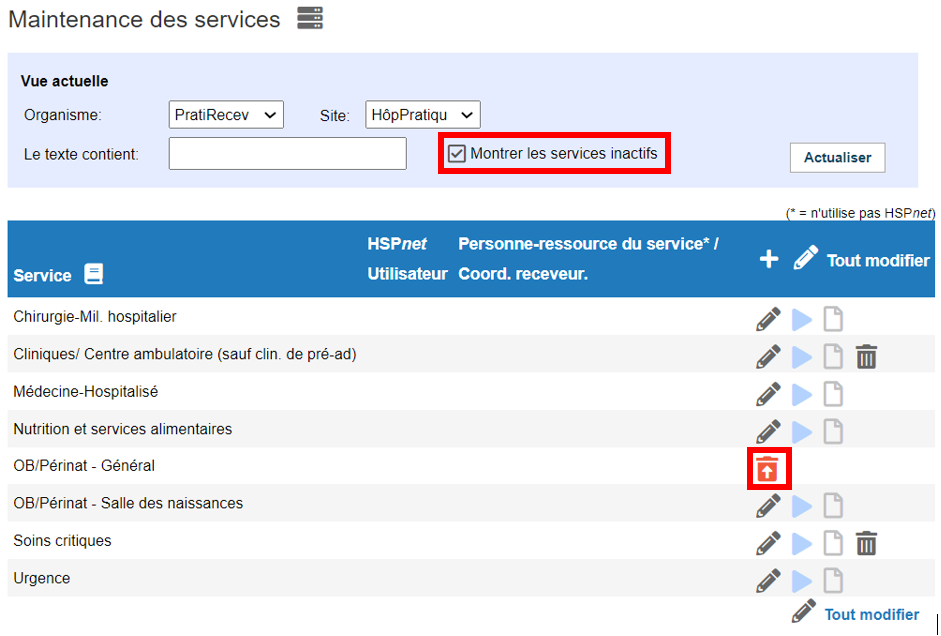
Si le service que vous recherchez n'apparaît pas dans la liste déroulante:
- Cliquez pour cocher la case à côté de "Montrer les services inactifs".
Pour réactiver un service à partir d'un site:
- Cliquez l'icône "Réactiver" pour restaurer le service.

<div class="greybox" align="left">

[image2021-3-10_10-29-40.png](attachments/68125432/68125393.png) (image/png)

[image2021-3-9_10-30-14.png](attachments/68125432/68125394.png) (image/png)

[trash.PNG](attachments/68125432/68125395.png) (image/png)

[add.PNG](attachments/68125432/68125396.png) (image/png)

[save green.PNG](attachments/68125432/68125397.png) (image/png)

[goto sites_service_programs.PNG](attachments/68125432/68125398.png) (image/png)

[image2021-3-8_14-55-42.png](attachments/68125432/68125399.png) (image/png)

[image2021-3-8_14-50-56.png](attachments/68125432/68125400.png) (image/png)

[image2021-3-8_14-41-16.png](attachments/68125432/68125401.png) (image/png)

[image2021-3-8_14-38-40.png](attachments/68125432/68125402.png) (image/png)

[image2021-3-8_9-56-0.png](attachments/68125432/68125403.png) (image/png)

[worddav68ae31fd646ea2c673f0f78beca2b03a.png](attachments/68125432/68125404.png) (image/png)

[worddav5ee1f2f62ad460665972d244b68ab2b1.png](attachments/68125432/68125405.png) (image/png)

[worddav6a843bef0397e0af43373fe8f28c7493.png](attachments/68125432/68125406.png) (image/png)

[worddave1d8985532b7666dc5091c54c9db4749.png](attachments/68125432/68125407.png) (image/png)

[worddavacafe01eebb26359b4a140ee1508a5e7.png](attachments/68125432/68125408.png) (image/png)

[worddav8a5b8c990c8efc5489c4c9da98ac884b.png](attachments/68125432/68125409.png) (image/png)

[worddavd065c5d82d8ad9ee0a12b38016238633.png](attachments/68125432/68125410.png) (image/png)

[worddav5a680f96c6637a584af175cb7716811f.png](attachments/68125432/68125411.png) (image/png)

[worddav95edb0ea01b2ecc3c1d1d69968908f54.png](attachments/68125432/68125412.png) (image/png)

[worddavd45a73e079c3fc2f3e6e2ff87f5fdf2f.png](attachments/68125432/68125413.png) (image/png)

[worddav9fd846f8e89964a20a56e1504306c45d.png](attachments/68125432/68125414.png) (image/png)

[worddav735633f9b9b882bf27fac43255f71f89.png](attachments/68125432/68125415.png) (image/png)

[worddave17d271f66017d22215166868b487588.png](attachments/68125432/68125416.png) (image/png)

[worddav4eb8f383a7b06757521fec238d9c37a9.png](attachments/68125432/68125417.png) (image/png)

[worddav0dbd861910840456e18cc16b398c35fd.png](attachments/68125432/68125418.png) (image/png)

[worddav4685182e0bf8b9bc6731f76d08a61e87.png](attachments/68125432/68125419.png) (image/png)

[worddavf82d634187f01ea57e079bfde098d790.png](attachments/68125432/68125420.png) (image/png)

[worddav7fd19607e1919d42efb65963f60f1359.png](attachments/68125432/68125421.png) (image/png)

[worddav757819056c480083b348493f3d48ceac.png](attachments/68125432/68125422.png) (image/png)

[1.PNG](attachments/68125432/68125423.png) (image/png)

[2.PNG](attachments/68125432/68125424.png) (image/png)

[6.PNG](attachments/68125432/68125425.png) (image/png)

[5.PNG](attachments/68125432/68125426.png) (image/png)

[4.PNG](attachments/68125432/68125427.png) (image/png)

[8.PNG](attachments/68125432/68125428.png) (image/png)

[9.PNG](attachments/68125432/68125429.png) (image/png)

[10.PNG](attachments/68125432/68125430.png) (image/png)

[12.PNG](attachments/68125432/68125431.png) (image/png)

[goto enrollment.PNG](attachments/68125432/68125434.png) (image/png)

[image2023-4-26_15-0-45.png](attachments/68125432/68125435.png) (image/png)
</div>
</div>
</div> </div>
<div id="footer" role="contentinfo">
<section class="footer-body">
Document generated by Confluence on nov. 05, 2023 21:53
<div id="footer-logo">[Atlassian](https://www.atlassian.com/)</div>
</section>
</div>
</div>